Building a Wireless-Modes Bench · Volume 1
Building a Wireless-Modes Bench — Vol 1: Receive First
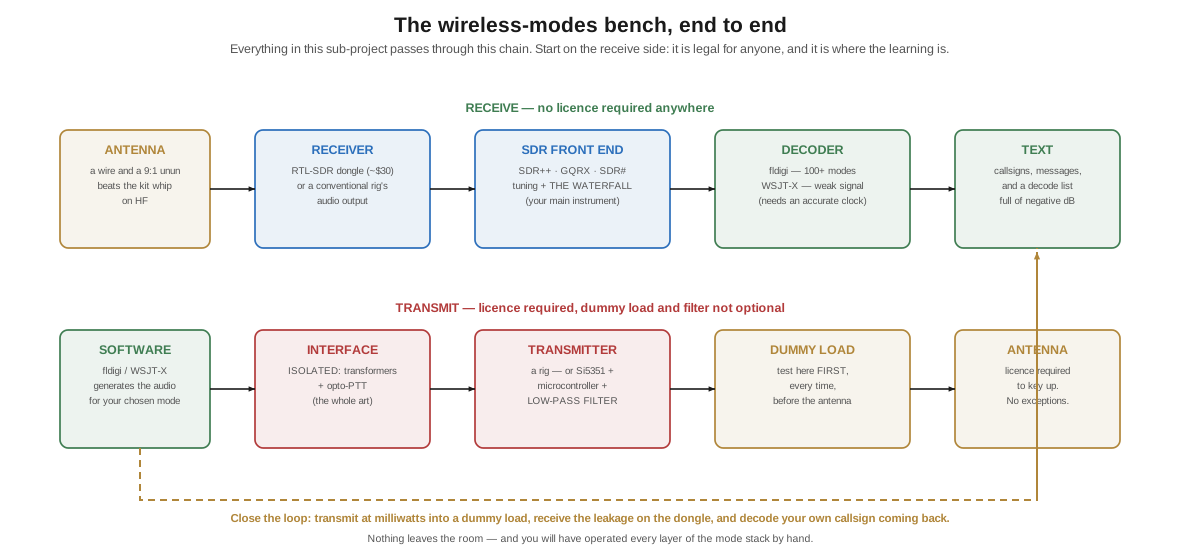
Every mode in this sub-project can be seen, heard, and decoded for about thirty dollars, with no licence and no antenna worth the name. Start on receive: it is legal, it is cheap, and it teaches you more per hour than anything else in radio.
1.1 Listen before you transmit
Five dives of theory, and now the part where you can actually put your hands on it.
The advice I give every time somebody asks how to get into digital modes is the same, and it is not what they want to hear: spend the first month receiving. Not because of some apprenticeship ritual, but for three genuinely practical reasons.
It is legal for anyone. In the United States and nearly everywhere else, listening requires no licence at all. You can build the entire receive bench described in this volume today, with no test, no callsign, no permission.
It is where the learning is. Nearly everything worth knowing about modes lives in the waterfall — what each one looks like, how wide it is, how it degrades, what a mistuned signal does. You cannot learn to recognise a mode by transmitting it. You learn it by staring at a screen for a while.
Transmitting badly is expensive and rude. A misconfigured digital station splatters, transmits over other contacts, or keys up on the wrong frequency, and everybody notices. Get the receive side working properly and the transmit side becomes a small increment. Do it the other way round and you will be the station everybody is complaining about.
1.2 The thirty-dollar starting point
The single highest-value purchase in amateur radio right now is a software-defined radio dongle.
The RTL-SDR started life as a European digital-television receiver — an RTL2832U demodulator paired with a tuner chip, usually an R820T2 or R828D. In 2012 people discovered the chipset could be told to dump raw I/Q samples instead of demodulating television, and a $20 TV stick became a general-purpose receiver covering roughly 500 kHz to 1.7 GHz with a few megahertz of instantaneous bandwidth.
That “I/Q” is not a coincidence. It is exactly the in-phase and quadrature pair from The Shift-Keying Family — the dongle hands your computer the two orthogonal components of the received signal, and every demodulator you could want is then a matter of software. This is the constellation diagram made real, and I find it genuinely delightful that the theory chapter and the hardware chapter turn out to be about the same two numbers.
Practical notes from my own bench:
- Buy the branded RTL-SDR Blog V4, or a Nooelec. The generic ones work, but the good ones have a TCXO (a temperature-compensated oscillator) instead of a drifting crystal, proper shielding, and a bias-tee. Frequency drift matters enormously for the weak-signal modes, which need your clock and your frequency to be right.
- For HF you need direct sampling or an upconverter. The bare tuner starts around 24 MHz. The V4 handles HF with a built-in upconverter path; older dongles need a Q-branch mod or an external upconverter such as the Ham It Up. Read the specification before you buy if HF is your target — and HF is where most of this sub-project lives.
- The antenna matters more than the dongle. The little telescopic whip in the kit is fine for VHF/UHF. For HF, twenty metres of wire out a window and a 9:1 unun will humiliate it.
- Common-mode noise will be your enemy, not sensitivity. A clip-on ferrite on the USB cable is the cheapest improvement you will ever make.
1.3 The software chain
Three pieces, and only the first is strictly required.
An SDR front end turns the dongle’s I/Q stream into a tuneable receiver with a waterfall. SDR++ is my current preference — cross-platform, fast, actively developed. GQRX is the Linux standby, SDR# the long-established Windows one, CubicSDR another good cross-platform option. Any of them will do; what you want is a waterfall display, because from here on the waterfall is your primary instrument.
fldigi, by Dave Freese W1HKJ, is the general-purpose decoder. It handles well over a hundred modes — RTTY, PSK31 and its relatives, MFSK16, Olivia, Hellschreiber, MT63, Contestia, Throb, and a long tail of oddities — and it is free. Point your receiver’s audio at it and it will decode. This is the single best tool for exploring the shift-keying family, because you can click on a signal in its waterfall and try decoders until text appears, which is a very effective way to learn what things look like.
WSJT-X, by K1JT and colleagues, handles the weak-signal family — FT8, FT4, JT65, JT9, WSPR, MSK144, Q65, FST4. It is a different program because it is a different kind of problem: rigid timing, structured messages, and a decoder that must know precisely when each slot begins.
🔴 Set your clock, or nothing will work. WSJT-X modes need your system time accurate to well under a second. Run NTP (
chronyorsystemd-timesyncdon Linux; enable internet time on Windows) and confirm it is actually synchronising. Well over half the “FT8 won’t decode anything” problems I have helped with were a clock a few seconds out. The symptom is characteristic: you can see signals in the waterfall and decode none of them.
Getting audio from the radio to the software is the part that trips people up. With an SDR dongle, there is no audio — the software has the samples. But if you want to feed fldigi from SDR++, you need a virtual audio cable: VB-Cable on Windows, or a PulseAudio/PipeWire null sink on Linux (pactl load-module module-null-sink). Set the SDR’s output to the virtual device and fldigi’s input to the same. It is five minutes of fiddling and then it just works.
1.4 No antenna? Use somebody else’s
If you live somewhere you cannot put up a wire — an apartment, a restrictive covenant, a dorm — you are not shut out.
WebSDR and KiwiSDR are internet-connected receivers, hundreds of them, scattered worldwide, that anybody may use through a browser. You get a real waterfall, real tuning, and real signals, on somebody else’s excellent antenna in a quiet rural location. The KiwiSDR network at kiwisdr.com/public is the easiest way in, and the University of Twente WebSDR is the classic.
This is a genuinely good learning tool and not merely a consolation prize. You can:
- Listen to the same signal from three continents at once and watch the fading differ — an education in propagation you cannot get any other way.
- Hear inverted speech by deliberately selecting the wrong sideband, and understand AM, SSB & the Voice Modes Vol 2 in about four seconds.
- Pipe the browser audio into fldigi through a virtual cable and decode RTTY from a receiver on the other side of the world.
1.5 Reading the waterfall: a field guide
This is the most useful thing in this volume. Once you can identify modes by sight, the bands stop being noise and start being a landscape.
Table 1 — Reading the waterfall: a field guide
| Mode | What it looks like | What it sounds like | Where |
|---|---|---|---|
| CW | A single narrow line blinking on and off | Beeping | CW segments, low in each band |
| SSB voice | A ragged one-sided blob ~2.5 kHz wide, only on one side of a fixed edge | A voice, or a duck if you’re mistuned | Phone segments |
| AM | A bright central carrier line with symmetrical blobs either side | Voice, plus a heterodyne if two are close | 3.885, 7.290; broadcast band |
| NBFM | A wide, flat, evenly-bright block ~16 kHz across | Voice with a black-silence background | 2 m, 70 cm repeaters |
| RTTY | Two parallel bright rails 170 Hz apart | A warble trading between two notes | RTTY segments |
| PSK31 | One very narrow line ~31 Hz wide, often several side by side | A steady tone with a buzz on it | ~14.070 and equivalents |
| Olivia | A wide fuzzy band, tones visibly hopping within it | A soft musical burbling | Just above the RTTY segments |
| FT8 | Dense stacked short blocks, all starting and stopping together on the quarter-minute | Rapid warbling in 13-second bursts | 14.074 and band equivalents |
| ALE | A distinctive rapid chirping sweep | A chirp, repeating | Scattered across HF |
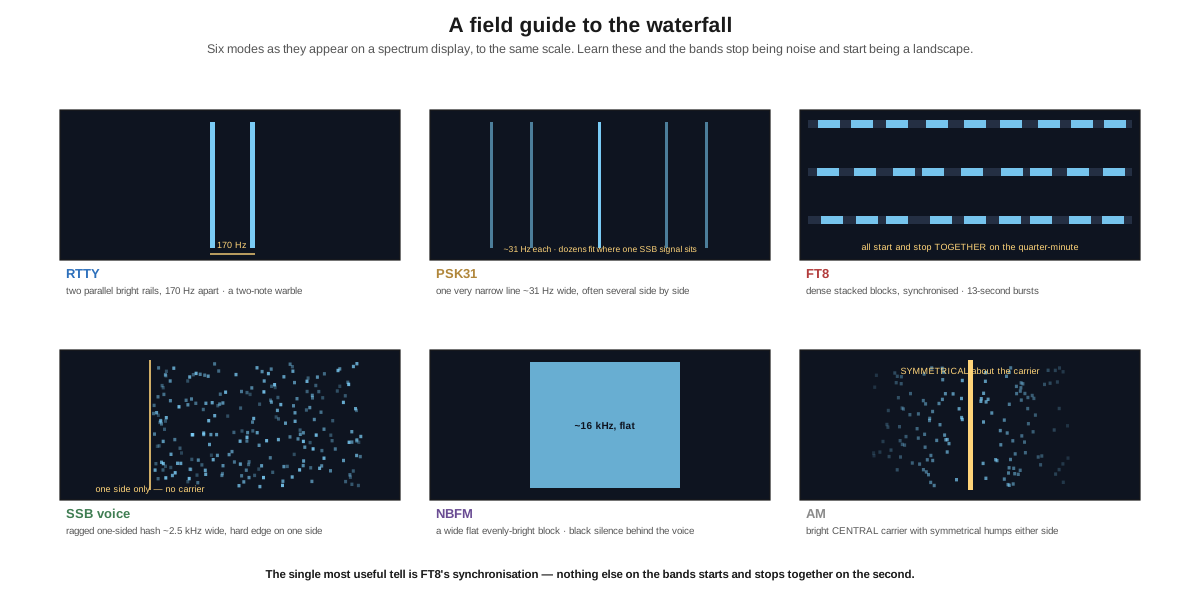
The single most useful tell is FT8’s synchronisation. Nothing else on the bands starts and stops together on the second. Watch a waterfall for thirty seconds and if a whole block of signals appears at once, holds for thirteen seconds, and vanishes together, you have found the FT8 watering hole and you have identified it without decoding a thing.
The second most useful tell is symmetry about a carrier: if you can see a bright line with matching humps on both sides, it is AM. SSB has no carrier and lives on one side only. That one distinction, made by eye, tells you the whole of the previous two dives.
Volume 2 is the transmit side — the interface you build, the isolation that keeps you out of trouble, and a beacon you can put on the air for the price of a takeaway.
1.5.1 Sources (Vol 1)
- H. Ward Silver, N0AX, “Wireless Modes — Part 2,” Nuts & Volts, May 2017 — the “Tuning In to Digital Modes” sidebar recommending the ARRL’s Modes and Systems page and its digital mode samples, and noting that fldigi “is completely free and can decode more than 100 modes.” (The article spells it “Flgigi.”) https://www.nutsvolts.com/magazine/article/wireless-modes-part-2
- fldigi — Dave Freese W1HKJ and contributors. https://sourceforge.net/projects/fldigi/ · documentation at http://www.w1hkj.com/
- WSJT-X — K1JT and the WSJT development group. https://wsjt.sourceforge.io/
- RTL-SDR: RTL2832U demodulator with R820T2/R828D tuners; the I/Q “direct sampling” discovery dates from 2012. Coverage, TCXO, and HF handling vary by model — ⟨check the specification of the exact dongle you buy; the V4’s HF path differs from earlier versions⟩ https://www.rtl-sdr.com/
- WebSDR (University of Twente and others) and the KiwiSDR public receiver network. http://websdr.org/ · http://kiwisdr.com/public/
- ARRL, “Modes and Systems” — digital mode audio samples for ear training. https://www.arrl.org/modes-systems
- Cross-links: every other dive in Wireless Modes; Teletype, Tape & RTTY → Modern Digital & the Raspberry Pi (the same software chain, aimed at RTTY and a teleprinter).